

Trello is one of the most widely used project management tools in the world. Millions of teams rely on it to track work, manage campaigns, coordinate operations, and document processes. What most of those teams do not know is that Trello does not backup their data, and neither does Atlassian.
If a board is accidentally deleted, a Power-Up corrupts your cards, or a former team member with admin access causes damage, Trello is under no obligation to recover what was lost. That is not a rumour or a technicality buried in the small print. It is written explicitly in Atlassian’s Terms of Service.
For organisations using Trello to manage live projects, client work, or business-critical workflows, this is a gap worth understanding clearly.
What Trello Is Actually Responsible For
Trello, like most cloud platforms, operates under the Shared Responsibility Model. This means the platform is responsible for keeping the service running. Your data is your responsibility.
Atlassian’s Terms of Service are direct on this point: “We are not responsible for any loss or corruption of Your Content, or the costs or expenses associated with backing up or restoring any of Your Content. You are solely responsible for securing and backing up Your Content.”
Atlassian reinforces this position in their official Cloud Security Shared Responsibilities whitepaper, which places the following obligation explicitly on the customer: create backups of your data using the available APIs to reflect the information accessibility that fits your needs.
This is not just Atlassian’s advice. It is their policy. The responsibility for your Trello data sits with your organisation, not with the platform.
When Trello and Atlassian Data Loss Has Happened
These are not theoretical risks. Platform-level incidents affecting Trello and Atlassian have caused real disruption for real organisations:
- In 2022, an Atlassian maintenance script error led to the accidental deletion of 775 customer sites. Affected teams were left without access to their data for up to 14 days.
- In 2025, an engineering deployment error caused a widespread Trello outage, preventing hundreds of teams from loading boards or accessing attachments.
- In 2026, a major system failure left millions of users worldwide unable to access their Trello boards and project workflows.
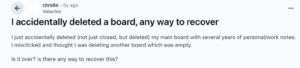
Platform incidents aside, the most common cause of data loss in SaaS tools is far more routine. Accidental deletion accounts for 44% of all SaaS data loss. A misclick, a bulk archive action, a poorly configured Power-Up, or a departing employee with admin access can wipe months of project history in a matter of seconds.
What You Stand to Lose
A Trello workspace holds more than task lists. It contains the operational memory of your team: how projects were structured, what decisions were made, what work was completed, and what is still in progress. Without independent backup, any of the following can be permanently lost:
- Boards, lists, and cards across your entire workspace
- Card comments, checklists, and due dates
- Attachments and uploaded files
- Custom fields and metadata
- Power-Up data and board configurations
For agencies managing client work, operations teams running live processes, or any organisation that has built workflows inside Trello over months or years, this data has real commercial value. Losing it is not just inconvenient. It creates direct operational risk.
Trello Backup and Your Compliance Obligations
If your organisation is working toward ISO 27001, SOC2 Type II, or GDPR compliance, or if you carry cyber insurance, independent data backup is a requirement, not a recommendation. Auditors need demonstrable evidence that you can recover your systems. The fact that your data lives in Trello does not satisfy that requirement.
The industry-standard 3-2-1 backup rule requires three copies of your data, stored across two different types of media, with one copy held offsite and independent of the primary platform. Trello hosting your boards is the primary copy. Without a separate independent backup, you have nothing to satisfy an audit with.
For organisations in regulated sectors or those seeking certification, this is a compliance gap with direct consequences.
Why Trello’s Native Export Is Not a Backup
Trello does offer a native export function, but it has significant limitations that make it an unreliable substitute for proper backup:
- Exports produce raw JSON files, or CSV for Trello Premium users only. These are not a usable backup. Restoring from them requires significant manual reconstruction.
- Attachments are not included in native exports, meaning files uploaded to cards are not captured.
- Linked data and relationships between cards and boards are not preserved.
- Custom fields, comments, and certain metadata elements are not reliably captured by competing backup tools either.
- There is no straightforward path to restore a native export directly back into Trello. During an incident, when speed matters most, this adds hours of manual effort at exactly the wrong moment.
A manual export taken occasionally is not a backup strategy. A backup strategy means automated, scheduled, complete copies of your data, with a tested and reliable restore path.
How BackupLABS Protects Your Trello Data
BackupLABS provides automated, independent backup and restore for Trello workspaces. It is built on 25 years of data protection expertise through the BackupVault Group, and is designed for organisations that cannot afford to lose the work held in their cloud tools.
Setup takes under two minutes. From there, BackupLABS runs silently in the background, covering your full Trello environment:
- Boards, cards, and lists including all content and structure
- Images, attachments, and uploaded files
- Custom fields and metadata
- Board configurations and most Power-Up data
Backups run automatically every 24 hours. You can also trigger an on-demand backup at any time, for example before a major restructure or team migration. The Pro plan includes backups every 12 hours and 90-day retention.
Restore Without Disruption
When something goes wrong, BackupLABS restores your data as a new instance rather than overwriting what currently exists in Trello. This means your live boards are never at risk during a recovery operation. You can review and verify the restored data before deciding how to proceed.
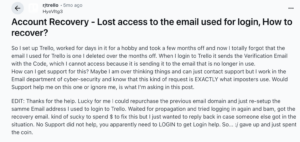
If a board has been deleted from Trello entirely, BackupLABS detects the change, alerts you, and gives you the option to restore it directly back into your account or download the ZIP archive. Point-in-Time Restore allows you to select from multiple backup dates, so you can roll back to exactly the state you need.
Security and Compliance Built In
BackupLABS connects to your Trello workspace via Trello’s secure connection using limited-access tokens. No passwords are stored or shared. All data is encrypted using AES-256 bit encryption both in transit and at rest, with two-factor authentication and SSO included as standard.
For organisations with data sovereignty requirements, global data residency is available across four locations: the UK, USA, EU, and Australia. The Bring Your Own Storage (BYOS) option allows you to sync backups directly to your own Amazon S3, Google Drive, or Dropbox, supporting the independent offsite copy required by the 3-2-1 rule and meeting ISO 27001, SOC2, and GDPR audit requirements.
Pricing That Scales With Your Boards, Not Your Headcount
BackupLABS charges per board, not per user. Your security costs do not increase as your team grows. Unlimited team members are included on every plan, and a 14-day free trial is available with no credit card required. A 30-day money-back guarantee covers any setup that does not fit your workflow.
Your Trello Workspace Is a Business Asset
Trello is a capable tool for managing work. It is not a backup solution. Atlassian’s own documentation makes clear that protecting your content is your responsibility, and their Terms of Service confirm they will not recover it if something goes wrong.
For organisations that have built workflows, tracked client projects, or managed ongoing operations inside Trello over months or years, that data has real value. A platform incident, a human error, or a rogue integration should not be able to erase it permanently.
BackupLABS was built to close exactly this gap. Automated, compliant, independent backup for the cloud tools your organisation depends on.
Start your free 14-day trial at Trello backup


