
Trello Backup & Restore
Your Trello Boards Protected & Secured
To back up Trello you use a third-party service that copies your boards on a schedule and can restore them. BackupLABS covers boards and lists, cards, attachments and metadata. It runs daily. Restores go straight back into your account. A second copy can go to your own Dropbox, Google Drive or Amazon S3.
Cloud apps like Trello protect their infrastructure. They don't protect your work. BackupLABS is the undo button Trello forgot to build.
No Credit Card Required
14-day free trial. Setup in 2 minutes. No-quibble money-back guarantee


Trello

Trello
Trusted by 1,300+ Organizations Worldwide
55 M+
Items Protected Daily
5.0
on Trustpilot
Compliance Ready:
- SOC2 Type II
- GDPR
- ISO 27001 Ready
Part of the BackupVault Group protecting business data since 2001
Official Trello Power-Up Integration
Trello protects their app
You are responsible for your data
Trello is a "Shared Responsibility" platform. While they ensure the service is available, their Terms of Service clearly state that users are solely responsible for maintaining backups of their content. If a user accidentally deletes a board or a rogue Power-Up corrupts your cards, Trello cannot get them back for you.
The cloud is not a magic place
Trello (Atlassian):
Terms of Service
"We are not responsible for any loss or corruption of Your Content, or the costs or expenses associated with backing up or restoring any of Your Content. You are solely responsible for securing and backing up Your Content."
Atlassian explicitly requires you to perform your own backups
It’s not just our advice—it’s official Atlassian policy. In their Cloud Security Shared Responsibilities whitepaper, Atlassian defines the critical gap between their infrastructure and your responsibility.
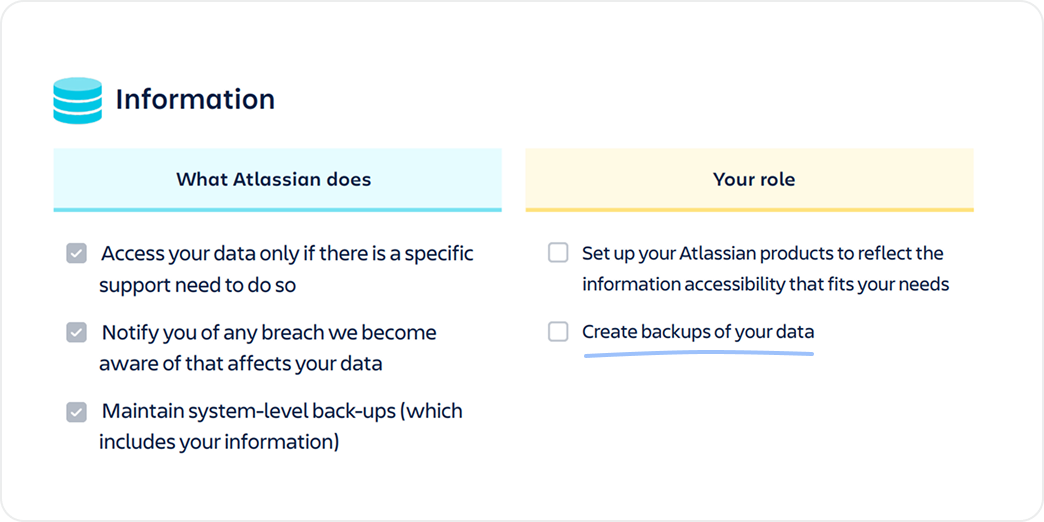
Your role:
Create backups of your data using the available APIs to reflect the information accessibility that fits your needs.



Why should you backup Trello?
Accidental Deletion Human error is the leading cause of data loss; protect against one-click permanent deletions
Platform Issues Ensure 24/7 access to your data even during service outages or platform sync errors
Malicious Users Secure your workspace from intentional data destruction by departing or disgruntled employees
Legal & Compliance Meet strict ISO 27001, SOC2, and insurance requirements for independent data storage
Ransomware & Viruses Defend your business-critical boards and lists from evolving cloud-native cyber threats
Business Continuity Don't lose years of critical organization data that will stop your daily operations
Trello Backup and Restore Core Features

Automatic Daily Backup
Backup Trello board data multiple times per day, with up to 90 days retention as standard

Full Trello Protection
Protect Boards, Cards, Lists, Images, Custom Fields, Attachments and most Metadata

Fully Encrypted & Secure
256bit AES encryption during transfer and rest, SSO and two-factor authentication as standard

Choose Data Storage Regions
Choose to store your backups in USA, UK, EU or Australia

Multiple Restore Options
Restore directly back into Trello, save locally or to your own cloud storage

Own Storage Options
Additional sync to your own cloud storage such as Dropbox, Google Drive or AWS S3 buckets

The Critical Difference:
Trello backup apps fail to backup or recover critical data such as: Custom Fields, Links, Headings, Comments and Emojis We ensure your unique Trello environment is fully protected.
Step: 1 Connect App
Connect App
We use Trello's secure API to connect to your workspace to automatic Trello backup protection. No passwords are shared. We use limited-access tokens to protect your data.


Coming Soon:


Trello
Connected
Authorize BackupLABS
Service: Trello

Read data
Read attachments
Read metadata
Step: 2 Backup
Backup
Select everything, or choose which boards to protect. Boards, cards, lists, metadata and more are protected.
Coming Soon:

Backup Successful

On-demand backup
Running...

Daily backups

Retention
Keep 90 days
Step: 3 Restore & Recover
Restore & Recover
Choose to restore directly back into Trello with no overwriting, save to your chosen cloud storage, or download as a zip file
Coming Soon:
Restore Successful

Attachments

Custom Fields

Boards & Cards
BackupLABS vs Manual Trello Backup
Manual Trello Backup

No attachments included

Only JSON export; CSV export Trello Premium only

No linked data

Hours of reconstruction
Not easy to restore back into Trello
BackupLABS

Fully automated daily Trello backup

256bit Encryption

Protect entire boards, cards and lists

Simple restore directly back into Trello
Save backups to your own storage
2022 - Atlassian data deletion crisis
A maintenance script error led to the accidental deletion of 775 customer sites, leaving teams without data for up to 14 days
Protect your Trello2025 - Configuration deployment error
An engineering update caused a widespread outage, preventing hundreds of teams from loading boards or accessing attachments
Protect your Trello2026 - Global board access outage
A major system failure left millions of users worldwide unable to access their Trello boards and vital project workflows
Protect your TrelloSecurity for Scaling Organisations

Bring Your Own Storage (BYOS)
Sync data automatically to Dropbox, Google Drive, and Amazon S3

Global Data Residency
Choose to store your data in the UK, USA, EU, or Australia

AES-256 Encryption
Enterprise-level security during data transfer and at rest, two factor authentication and SSO as standard
Built on Reliability

Expert Technical Support
You aren’t talking to an AI chatbot. Our support team is led by human engineers with decades of experience. We pride ourselves on being more responsive and technically accurate than VC-funded providers.

No-Quibble Money-Back Guarantee
If BackupLABS doesn't seamlessly fit your workflow or fails to protect your specific setup, we will refund you immediately No questions asked
Trello Backup Pricing
No credit card required, free 14-day trial
Boards

Essentials
Secure baseline for individual projects

Pro
Full protection for growing agencies and teams

Pro
Full protection for growing agencies and teams
$0.00 / month

2 backups per day (every 12 hours)
90-day retention
Save to your own storage option (BYOS - S3 / Google Drive / Dropbox)
Audit Trail & Activity Logs
Priority engineering support
Monthly
Annual
14-Day Free Trial

No Credit Card Required

30-Day Money-Back Guarantee
